
OverRec
Draw an overlay rectangle of any size over any window, resize apps to exact dimensions, and capture precise screenshots — with full CLI support for automation and AI agents.
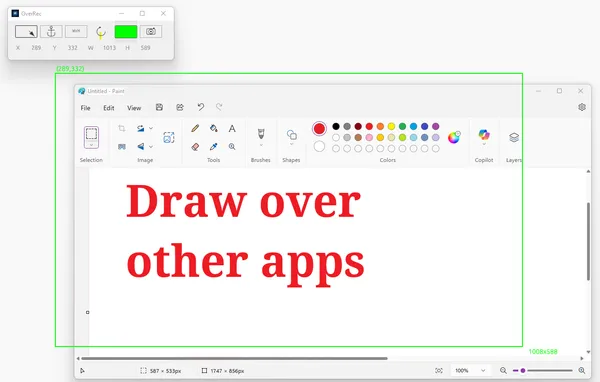
Draw Over Any App
An always-on-top overlay rectangle that stays visible above all other windows. Supports multiple monitors and continuously displays the rectangle’s exact location and size — perfect for resizing apps or measuring screen regions with precision.
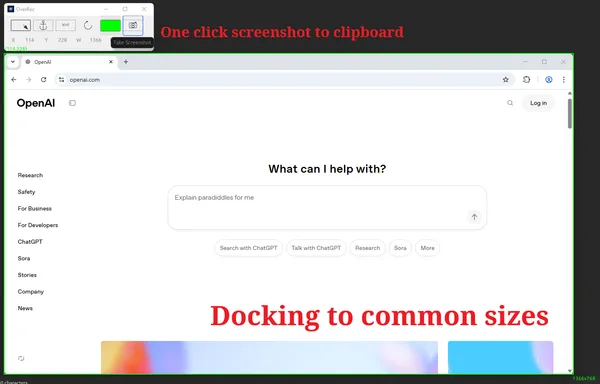
Three Powerful Drawing Modes
Choose the mode that fits your workflow: Free Drawing for mouse-precise rectangles of any size, Docking Mode to snap to common resolutions (320×240, 640×480, 1280×720, 1920×1080, and more), or Fixed Coordinate Mode to enter exact X, Y, width, and height values for pixel-perfect positioning. One-click screenshot captures the region straight to your clipboard.
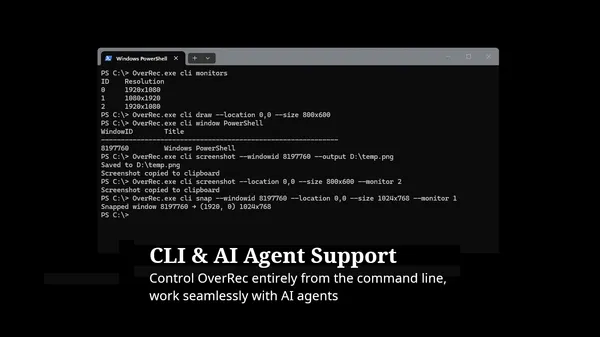
CLI & AI Agent Support
Control OverRec entirely from the command line — no GUI required. List monitors, draw overlays at specific coordinates, and capture screenshots programmatically. Designed to work seamlessly with AI agents and automation scripts: an agent can call OverRec to capture screen regions or draw attention overlays as part of a larger automated workflow.
OverRec.exe cli draw --location 0,0 --size 1920x1080 --color red
OverRec.exe cli screenshot --location 100,200 --size 640x480 --clipboard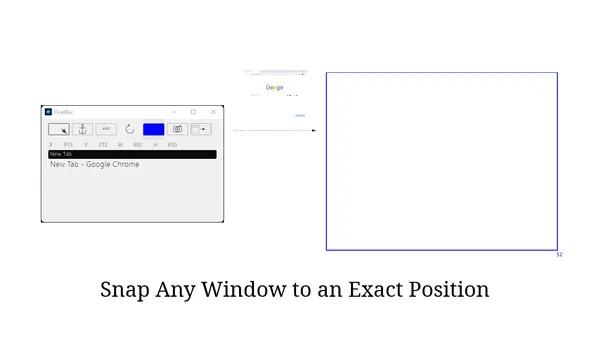
Snap Any Window to an Exact Position
Draw a rectangle where you want a window to go, then use the Snap button to instantly move and resize any window to fill it — pixel-perfect, every time. Search for windows by title in any language. Combine with CLI scripting to restore your entire workspace layout in one command.