Selection-Copilot

How to copy the formulas in ChatGPT response to word

How to copy the formulas in ChatGPT response to word

Copy the formulas in ChatGPT response to word, simply 3 steps:

  1. Copy the ChatGPT response as markdown (keep LaTeX formulas)
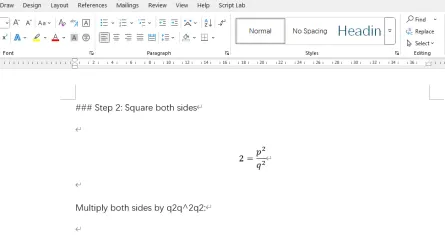
  2. Select the formulas in Word and insert as equation
  3. Convert LaTeX formulas in Word math editor

Step 1: Copy as Markdown with LaTeX

For the first step, you will need Selection Copilot, a Chrome Extension. Install the extension and use its copy as markdown in the context menu to copy formulas in ChatGPT (or Gemini, Claude, Qwen, Deepseek, Poe, …).

How to copy the formulas in ChatGPT response to word

How to copy the formulas in ChatGPT response to word

Copy the formulas in ChatGPT response to word, simply 3 steps:

  1. Copy the ChatGPT response as markdown (keep LaTeX formulas)
  2. Select the formulas in Word and insert as equation
  3. Convert LaTeX formulas in Word math editor

Step 1: Copy as Markdown with LaTeX

For the first step, you will need Selection Copilot, a Chrome Extension. Install the extension and use its copy as markdown in the context menu to copy formulas in ChatGPT (or Gemini, Claude, Qwen, Deepseek, Poe, …).