Type something to search...
Eidograph Documentation Is Now Live

Eidograph Documentation Is Now Live

Eidograph now has a dedicated documentation site: eidograph-docs.metaphorprojects.link.

Whether you are opening the app for the first time, trying a 3D construction, looking up an Eidolang command, or connecting an AI agent, the new site gives you one structured place to find the answer.
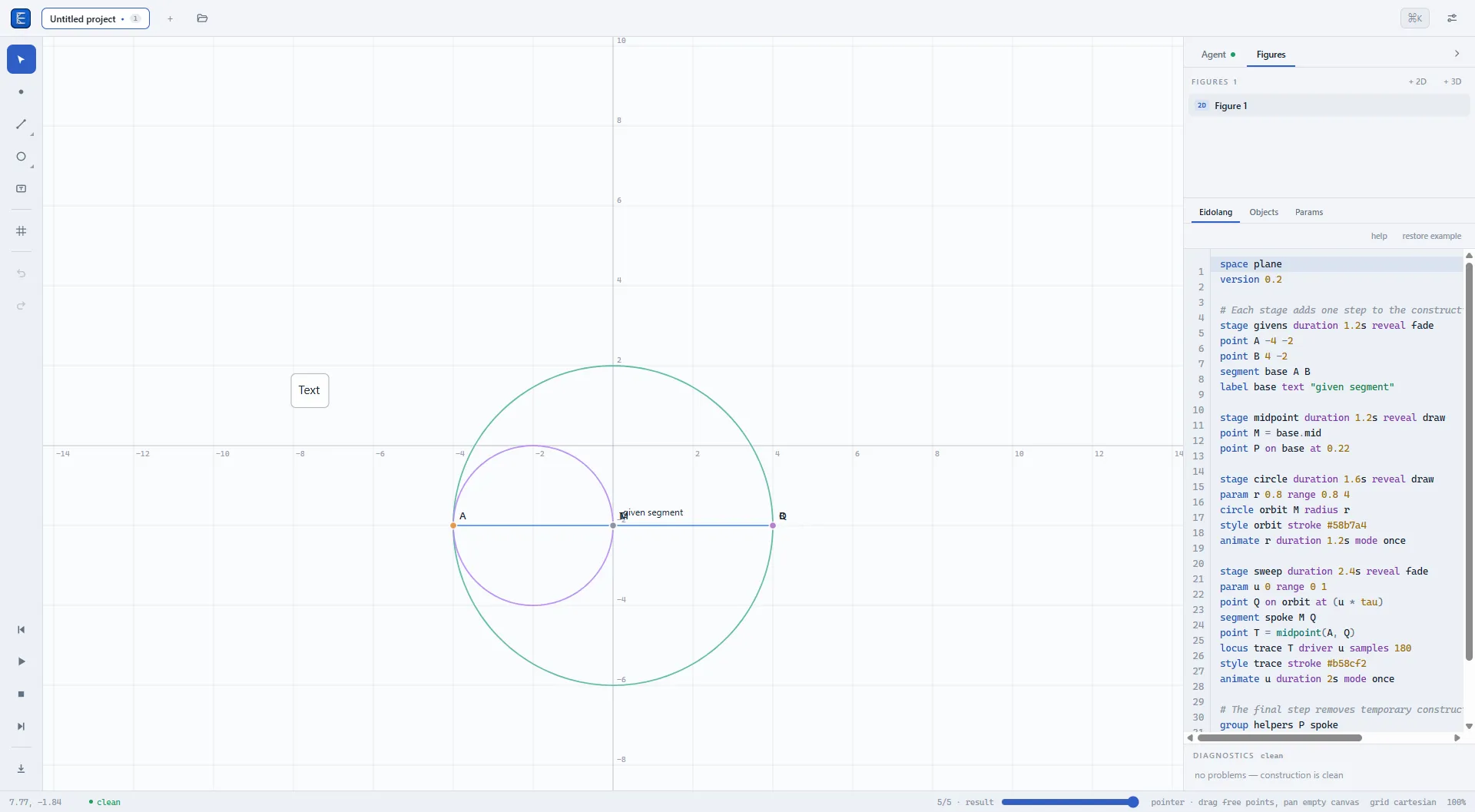
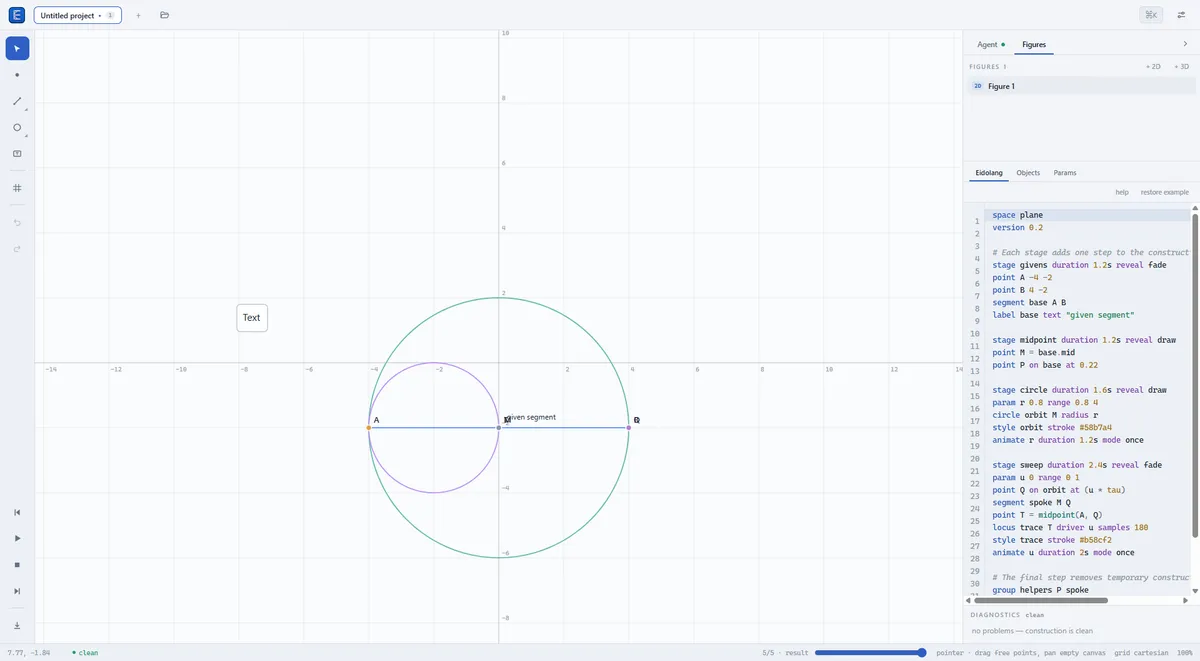
Eidograph's workspace with a geometric construction and its synchronized Eidolang script

Start with a construction, not a manual

The documentation begins with a five-minute quick start. It introduces the canvas, toolbar, figure list, and Eidolang editor by walking you through a real construction, then shows you how to save and reopen the project.

From there, the usage guides cover the workflows you are most likely to need next:

  • editing free, bound, and derived objects;
  • organizing projects, figures, scripts, and .eido files;
  • building and navigating 3D geometry;
  • animating parameters and exporting SVG, PNG, GIF, or 3D results;
  • configuring the app on desktop and tablet.

Each section is designed to work as both a guided lesson and a reference you can return to while Eidograph is open.

Learn Eidolang from working examples

Eidograph keeps the visual construction and its readable Eidolang source in sync. The documentation explains the model behind that relationship—not only the syntax, but also why a point is free to drag, bound to a path, or derived from other objects.

The full Eidolang reference covers expressions, functions, parameters, animation stages, presentation commands, macros, assertions, and the current 2D and 3D command sets.

If you would rather learn by changing something that already works, the examples section includes downloadable .eido projects. Open one in the installed app, drag its points, move a parameter slider, or edit the script to see the construction update. The collection ranges from a parametrized square and midpoint construction to a stella octangula and a sine-and-cosine surface.

Connect an agent with clear boundaries

The agent integration guide explains the three ways an AI agent or automation can work with Eidograph:

  • the in-app Agent on Windows and Android;
  • the MCP Streamable HTTP server in the Windows app;
  • the JSON REST API in the Windows app.

It also documents setup, figure exposure, tool permissions, diagnostics, and a recommended sequence for reading a figure and validating a change. That makes the integration useful without hiding where data can go or which actions a connected client may perform.

Available in eight languages

The same documentation structure is available in Simplified Chinese, English, Traditional Chinese, Portuguese for Portugal, Portuguese for Brazil, Spanish, French, and German. Use the language menu at the top of the site to switch at any time.

Because the docs have their own searchable home, detailed reference material can evolve alongside Eidograph while the Metaphor Projects blog remains focused on releases, ideas, and examples.

Visit the Eidograph documentation, then get Eidograph on Google Play or download it from the Microsoft Store.
Related Posts

Learn Vocabulary Effortlessly with Infini Alchemy

Learn Vocabulary Effortlessly with Infini Alchemy

Are you looking for a fun and engaging game that can also help you learn new words? Look no further! Infini Alchemy is a creative alchemy game where you can combine basic elements like Water, Fire, Ea

read more
How to copy the formulas in ChatGPT response to word

How to copy the formulas in ChatGPT response to word

Copy the formulas in ChatGPT response to word, simply 3 steps:Copy the ChatGPT response as markdown (keep LaTeX formulas) Select the formulas in Word and insert as equation Convert LaTeX fo

read more
Master KET Vocabulary Through Alchemy: A New Learning Adventure

Master KET Vocabulary Through Alchemy: A New Learning Adventure

Infini Alchemy is an innovative web-based game that transforms vocabulary learning into an engaging alchemical adventure. By dragging and dropping elements to craft new items, players naturally absorb

read more
See the World Differently: Camera Effects in Sub Dimension

See the World Differently: Camera Effects in Sub Dimension

Your camera captures moments. Effects transform them into art. Sub Dimension comes packed with real-time visual effects that apply live in the viewfinder — what you see is what you get, whether you'r

read more
Real-Time Video Effects with GPU Acceleration

Real-Time Video Effects with GPU Acceleration

GPU rendering is now available in Sub Dimension Camera. This feature eliminates the need to wait for a video to "render" after recording. You can now preview and capture complex artistic filters in re

read more
longarm Is Now Available on Android

longarm Is Now Available on Android

longarm is now available on Android through Google Play. longarm turns an Android phone or tablet into a controllable remote endpoint for developers, testers, automation scripts, and AI agents. Start

read more

Move Any Window to an Exact Position and Size

You've set up a perfect workflow: your code editor on the left, browser on the right, terminal at the bottom. Then you restart your machine and spend the next five minutes dragging windows back into p

read more

Let an AI Agent Resize a Window and Take the Screenshot

Screen automation is easiest to trust when the result is visible and repeatable. In this short demo, an AI agent uses the OverRec screen skill to find a browser window, resize it to an exact rectangle

read more
How to Screenshot a YouTube Video (or Any Video Site) with OverRec

How to Screenshot a YouTube Video (or Any Video Site) with OverRec

You're watching a tutorial, a product demo, or a live stream and you want a clean frame from the video — no browser toolbar, no tab bar, no distractions. Here are two ways to do it with OverRec. ![Yo

read more
Record Any Screen Region to GIF or MP4 with OverRec

Record Any Screen Region to GIF or MP4 with OverRec

Screen recording usually starts with a compromise: capture the whole monitor and crop it later, or wrestle with a recorder's region selector every time. OverRec now records the exact rectangle you dra

read more
Meet Eidograph: A Geometry Workspace Built for AI Agents

Meet Eidograph: A Geometry Workspace Built for AI Agents

Asking an AI model to explain a theorem is easy. Asking it to build the actual figure is harder. A useful geometry agent must do more than return an image that looks plausible. It needs to create exa

read more
Give AI Agents Screen Control: OverRec's MCP Server

Give AI Agents Screen Control: OverRec's MCP Server

AI coding agents are good at reasoning about a task, but bad at touching the screen — finding a window, lining it up, and grabbing a clean screenshot has always meant gluing together ad-hoc scripts. O

read more
Run repeatable Android workflows with longarm batch tasks

Run repeatable Android workflows with longarm batch tasks

longarm now supports batch tasks: saved Android automation flows that can run more than one action at a time. Instead of sending a separate request for every tap, delay, app launch, or screenshot, yo

read more
Eidograph Is Now Available on Android

Eidograph Is Now Available on Android

Eidograph is now available on Android. It brings the same dynamic 2D and 3D geometry workspace to phones and tablets: const

read more
Every Eidograph Example Now Plays in Your Browser

Every Eidograph Example Now Plays in Your Browser

The Eidograph documentation now has a full library of ready-made geometry projects, and none of them require an install to look at. Every example carri

read more
Da a los agentes de IA control sobre la pantalla: el servidor MCP de OverRec

Da a los agentes de IA control sobre la pantalla: el servidor MCP de OverRec

Los agentes de programación con IA son buenos razonando sobre una tarea, pero malos tocando la pantalla: encontrar una ventana, alinearla y obtener una captura limpia siempre ha implicado pegar script

read more
Conoce Eidograph: un espacio de geometría creado para agentes de IA

Conoce Eidograph: un espacio de geometría creado para agentes de IA

Pedir a un modelo de IA que explique un teorema es fácil. Pedirle que construya la figura real es más difícil. Un agente geométrico útil debe hacer algo más que devolver una imagen que parezca correc

read more
La documentación de Eidograph ya está disponible

La documentación de Eidograph ya está disponible

Eidograph ya tiene un sitio de documentación propio: eidograph-docs.metaphorprojects.link. Tanto si abres la aplicación por primera vez como si quiere

read more
Eidograph ya está disponible en Android

Eidograph ya está disponible en Android

Eidograph ya está disponible en Android. Lleva el mismo espacio de trabajo de geometría dinámica en 2D y 3D a teléfonos y t

read more
让 AI Agent 直接控制屏幕:OverRec 的 MCP 服务器

让 AI Agent 直接控制屏幕:OverRec 的 MCP 服务器

AI 编程智能体擅长推理任务,但并不擅长真正操作屏幕: 找到一个窗口、把它摆正,再截出一张干净的图片,过去往往需要拼接一堆临时脚本。OverRec 通过作为 Model Context Protocol(MCP)服务器运行,填补了这道缺口。这样一来,无论是 Claude Code、Claude Desktop,还是你自己的工具

read more
认识奕图:为 AI 智能体打造的几何工作空间

认识奕图:为 AI 智能体打造的几何工作空间

让 AI 模型解释一个定理很容易,让它真正构造出定理中的图形却要困难得多。 一个实用的几何智能体不能只返回一张看起来合理的图片。它需要创建精确对象、保留依赖关系、发现无效命令、修正自己的工作,并留下可供人检查和继续编辑的构造。 奕图 是一款围绕这套流程设计的全新动态几何工作空间。可视化画布与纯文本构造语言是同一图形的两种视图,因此人工编辑与智能体编辑会汇入同

read more
奕图文档站正式上线

奕图文档站正式上线

奕图现在有了专属的文档站:eidograph-docs.metaphorprojects.link。 无论你是第一次打开应用、想尝试 3D 构造、需要查找一条 Eidolang 命令,还是准备接入 AI Agent,现在都可以在一个结构清晰的网站中找到答案。 ![奕图工作空间中的几何构造及与其同步

read more
Eidograph 现已上线 Android

Eidograph 现已上线 Android

Eidograph 现已上线 Android。它将同一套动态 2D 与 3D 几何工作区带到手机和平板电脑:你可以直接在画布上构造、编写 Eidolang 脚本,或在同一图形的两种视图之间切换。 当一个几何任务开始于问题而非图示时,Androi

read more
Todos los ejemplos de Eidograph ya se reproducen en el navegador

Todos los ejemplos de Eidograph ya se reproducen en el navegador

La documentación de Eidograph ya incluye una biblioteca completa de proyectos de geometría listos para usar, y ninguno exige una instalación para verlo

read more
文档站的每个示例,现在都能在浏览器里播放

文档站的每个示例,现在都能在浏览器里播放

奕图文档站现在收录了一整套现成的几何项目,而且看之前不需要安装任何东西。每个示例都带有一个 View in Viewer 链接,会在奕图查看器中打开该项目。查看器是奕图画布的只读版本,直接运行

read more