Readpeater Is Now Available on Google Play
- Metaphor Projects
- Application
- 16 Oct, 2026
Readpeater is now available on Google Play. The read-aloud practice app that started on Windows now runs on Android phones and tablets, so a reading round can happen wherever your child does their homework: at the desk, on the sofa, or on the way to school.
The idea stays simple. Read a short passage aloud, see what went well and which words need another look, then read it again. With each round the text becomes more familiar, and your child reads it more accurately, more smoothly, and with more confidence. Readpeater works with English and Chinese texts.
Get Readpeater on Google Play.
Why read it again?
Repeated reading means reading the same short passage aloud several times. It is a widely used way to build reading fluency. On the first read, most of the effort goes into working out the words. On later reads, your child recognizes words faster, keeps a steadier pace, and has more attention left for meaning.
Readpeater gives every round a clear report, so you and your child can compare the first try with the third instead of relying on a general impression.
A practice round on your phone or tablet
- Choose a text. Use a school passage, a story your child likes, or a sample. Import a
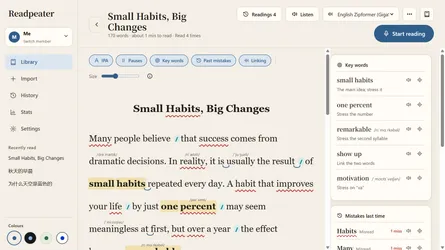
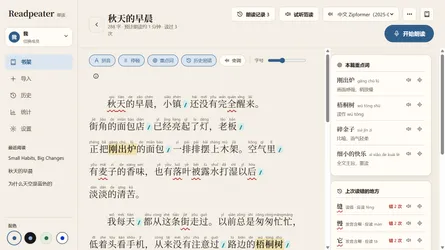
.txt,.md, Word, or PDF file, open a web link, paste text, or on supported devices bring in text from a photo of a textbook page. Group texts into collections, for example one per textbook unit. - Prepare. Look over the passage with pinyin or IPA and the words missed last time, or listen to it read aloud first. Optional reading assistance adds pause marks and key words.
- Read aloud. As your child reads into the microphone, Readpeater follows their place in the text and gives only light hints, so their attention stays on reading.
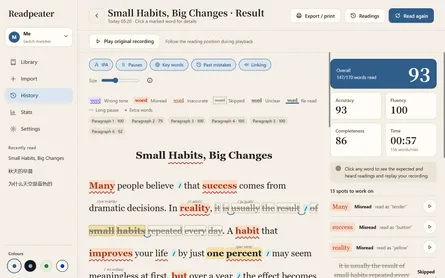
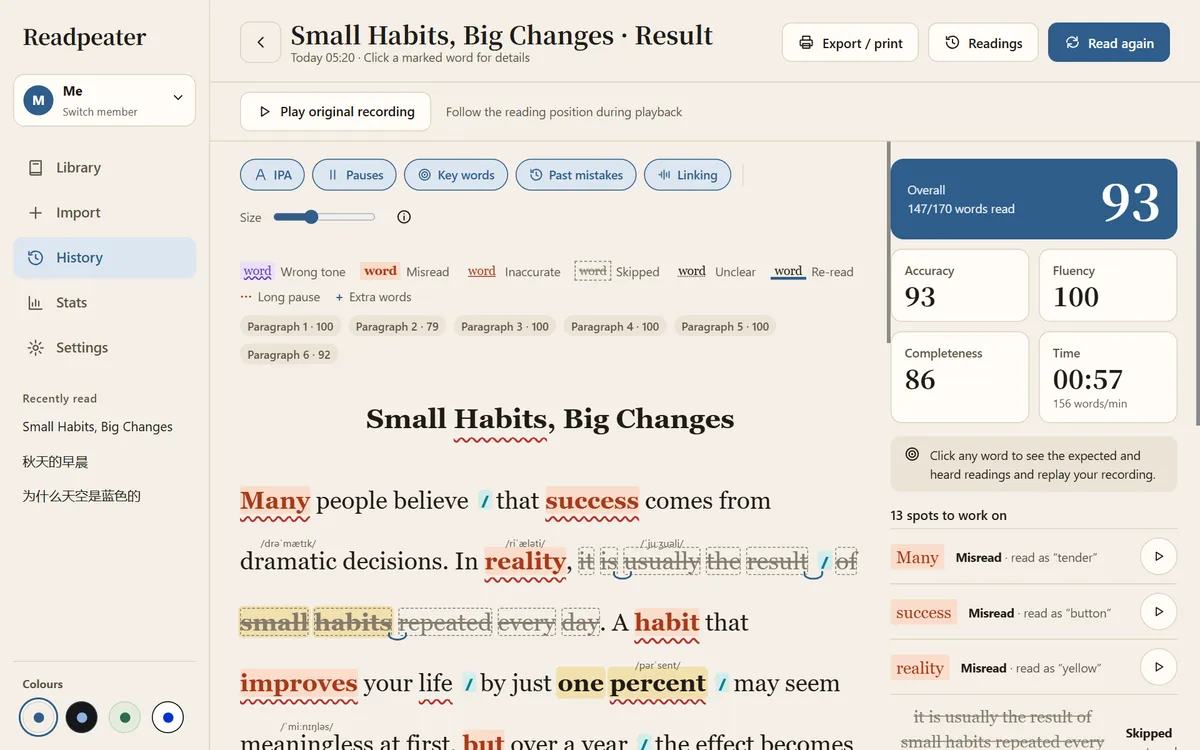
- Review. The whole passage is marked to show words read correctly and words that may have been skipped, repeated, or misread, along with accuracy, completeness, fluency, and an overall score. Tap a marked word to replay that part of the recording.
- Read it again. The bookshelf shows how many times each text has been read, the latest score, and the trouble words. Each text’s reading record shows how the score changes from round to round.
A phone is enough for a quick round before bed. A tablet gives the passage, the marks, and the score cards room side by side, which makes it a comfortable place to go through the report together.
Gentle support for children who find reading hard
For children with dyslexia, ADHD, or other reading difficulties, reading aloud in front of others can be stressful, and long texts can be hard to stick with. Readpeater keeps practice short and specific: one passage at a time, a report that points to the exact words to look at again, and visible progress through scores, practice time, streaks, and recurring mistakes.
The reading view can be adjusted with fonts, text size, reading marks, and paper, night, green, or high-contrast color schemes. Your child can practice privately, without worrying about mistakes in front of others, then go through the report with you.
Readpeater is a practice tool, not a diagnostic test or a treatment. Use it alongside the support your child receives from teachers, reading specialists, or therapists.
Made for families, private by default
- Member profiles. Siblings can share one device while each keeps their own reading history, statistics, and vocabulary list.
- On-device scoring. After you download the language model you choose, speech recognition and scoring run on the device.
- No account required. Articles and reading records are stored locally. Optional online services, such as reading assistance, word explanations, photo text recognition, and spoken text, are used only when you set them up and choose those features.
- 12 interface languages. English, Simplified and Traditional Chinese, Indonesian, Japanese, Khmer, Korean, Lao, Malay, Burmese, Thai, and Vietnamese.
See the Readpeater privacy policy for details.
Download Readpeater on Google Play, get it for Windows from the Microsoft Store, or visit the Readpeater product page to learn more.